Remembering phone numbers can be hard, I get it. Which is why we have something called contacts on our phones.
DNS is similar, it converts your website names into machine readable IP addresses.
One such example is Google.com (domain name) –> 8.8.8.8 (ipv4) and 2001:4860:4860::8888 (ipv6)
Now requesting a website actually forces your computer to go through several steps.
Lets say you request a website like johnmdtech.com,
1.) Your computer checks your local cache if you have already searched the site. It does this by going to your DNS Cache.
If it finds the IP address there, there is no DNS request needed.
On how to check your local DNS cache on windows, you simply go to ‘Command Prompt’, then type in ‘ip config /displaydns’ , and it will give you the recently resolved domain names.
On macOS, you can go to your terminal, and type
‘sudo discoveryutil udnscachestats’ and click enter, then you will be asked for your password and you can enter it and so on.
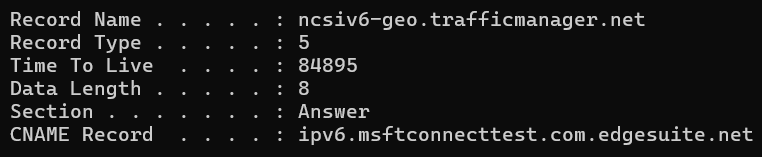
So something interesting is that the DNS cache expires based on the Time To Live Value which is in seconds. Most common domains have TTL values between 5 mins to 24 hours.
2.) If the site isn’t found in your local dns cache, the computer goes to the DNS resolver which is provided by your Internet Service Provider(ISP).
You can look at your ISP cache by running an ‘nslookup [website name]’
Typically the results will provide a server(your ISP) and an address. Since in a server many websites share the same IP address, you won’t be able to access the site with the IP address only, you may need the domain name.
Similar to houses on the street having the same street address.
3. If the IP address isn’t found on your DNS resolver then it goes to the ROOT server.
The DNS resolver forwards the query “johnmdtech.com” to the ROOT server. The Root servers are basically the backbone of the internet and is capable of redirecting you to the correct TLD address, in this case it’s the .com address.
4. The root server then recognizes the TOP-LEVEL Domain or TLD which in this case is .com the TLD in johnmdtech.com . The root server asks the DNS resolver where the .com domains are located. This happens if it can’t recognize johnmdtech which is the domain name. There are 13 total root servers.
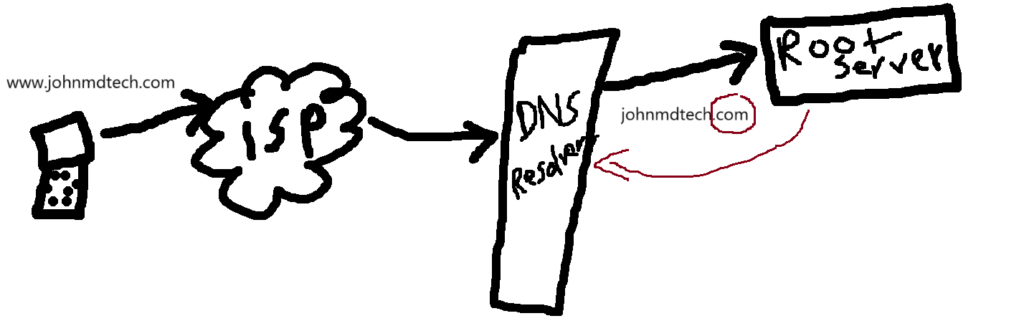
5. Now after this, the DNS resolver asks the Top Level Domain Server (the TLD) about the list of all .com domains, and the TLD server replies with the authoritative nameserver that knows everything about johnmdtech.com .
6. Now the DNS resolver asks the authoritative nameserver(like ns1.yourhost.com) for the IP address of johnmdtech.com , and then the authoritative nameserver scans zone files, and replies with the IP address of johnmdtech.com.
After all these steps are done, the IP address is stored in the ISP cache or the local cache.